Technology moves fast—and if you’re not actively tracking innovation alerts, emerging tech frameworks, and evolving digital device strategies, you’re already behind. Whether you’re looking to understand core technology concepts, implement machine learning frameworks, or strengthen your home network security tips, this article is designed to give you clarity without the noise.
Many professionals and tech enthusiasts struggle to separate meaningful breakthroughs from passing trends. The result? Missed opportunities, inefficient systems, and avoidable security risks. Here, we break down complex topics into practical insights you can apply immediately—whether you’re optimizing your devices, exploring automation, or building smarter workflows.
Our content is grounded in continuous research, real-world testing, and analysis of current innovation patterns across the tech landscape. We focus on what works, what’s emerging, and what truly matters.
By the end of this guide, you’ll have a clearer understanding of today’s most important digital strategies—and how to apply them confidently in your own environment.
Your Digital Front Door: Why Home Network Security Matters Now
The average home runs dozens of connected devices—laptops, gaming consoles, smart thermostats—each a potential entry point. Some argue hackers only target big companies. However, that’s outdated thinking. A poorly secured network is like leaving your front door unlocked in a busy neighborhood.
So what can you do? Start with simple home network security tips: change default router passwords, enable WPA3 encryption, update firmware, and create a guest network. In other words, build layers. While it may feel technical, these steps are straightforward and dramatically reduce risk for modern households today.
Fortify the Core: Mastering Your Router’s Security Settings
Your router is the front door to your digital life. Lock it down properly, and you instantly reduce the risk of data theft, bandwidth hijacking, and privacy breaches. Leave it exposed, and you’re basically taping your house key to the mailbox (not ideal).
Change Default Admin Credentials
Most routers ship with default logins like admin/admin or admin/password. These credentials are publicly documented and often the FIRST thing attackers try.
Step-by-step:
- Type your router’s IP address (commonly 192.168.1.1) into your browser.
- Log in with the current admin username and password.
- Navigate to Administration or System Settings.
- Create a STRONG, unique username and password.
The benefit? You immediately block the #1 entry point hackers exploit. That’s foundational home network security tips in action.
Keep Firmware Updated
Firmware is your router’s operating system. Updates patch newly discovered vulnerabilities (security flaws hackers actively scan for).
Log in to your router panel, find Firmware Update or Advanced Settings, and click Check for Updates. Enable automatic updates if available.
The payoff: BETTER performance, improved stability, and protection against emerging threats. Think of it as vaccinating your network.
Disable Risky Features
- WPS (Wi-Fi Protected Setup): Lets devices connect with a PIN. Convenient, but vulnerable to brute-force attacks.
- UPnP (Universal Plug and Play): Automatically opens ports for devices. Handy for gaming, risky for security.
Disable both in Advanced or Wireless Settings.
Yes, you sacrifice a bit of convenience. But you gain CONTROL, stronger defenses, and peace of mind—benefits that far outweigh a few extra clicks.
Building Digital Walls: Encryption and Password Protocols
The first time I checked my router settings, I realized I was still using WPA2 from 2014 (yikes). That’s when I learned encryption—the process of scrambling your Wi-Fi signal so outsiders can’t read it—is your network’s INVISIBLE SHIELD. Today, WPA3 is the gold standard. It offers stronger protection against brute-force attacks, which are automated attempts to guess your password. If WPA3 isn’t available, WPA2-AES is the minimum acceptable level (anything older is basically leaving the door cracked open).
Some argue encryption is overkill for a small household. “Who would target me?” they say. But attackers often scan neighborhoods automatically, not personally. Convenience shouldn’t trump BASIC SECURITY.
Next: passwords. Skip “John123” or “password.” Instead, use long passphrases like 4CorrectHorseBatteryStaple!—easy to remember, hard to crack (length beats complexity every time, according to NIST guidelines).
• Use at least 14–16 characters
• Avoid common phrases
• Never reuse router admin credentials
A password manager generates and stores complex, unique passwords for both Wi-Fi and your router panel (pro tip: let it create 20+ character strings).
If you’re reviewing home network security tips, pair encryption with device optimization strategies like [speed up your laptop with these performance tweaks]().
Segment and Isolate: The Power of a Guest Network
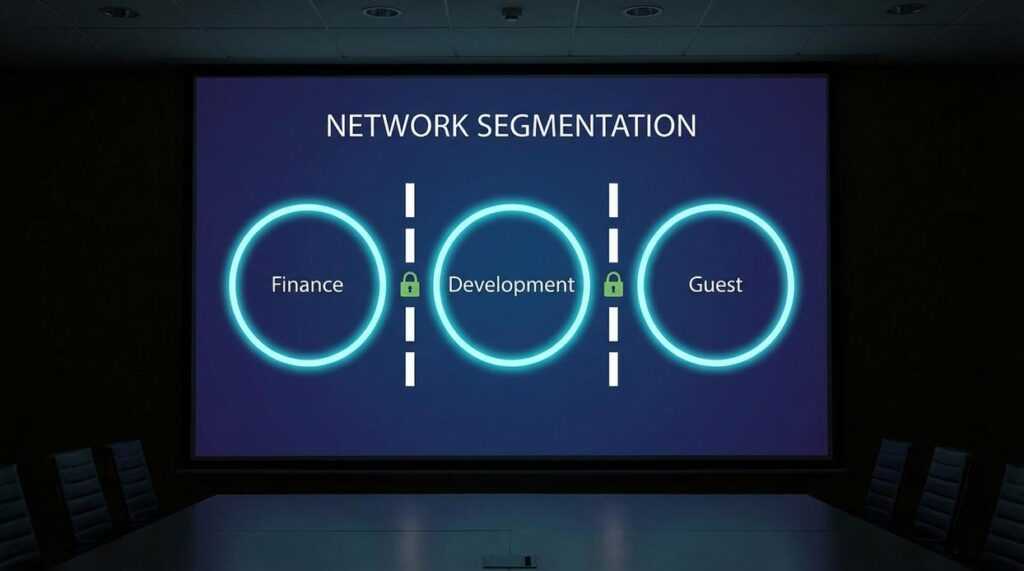
A guest network is a separate, isolated Wi‑Fi lane running on the same router as your main connection. It feels identical when you tap the network name—same bars, same hum of connectivity—but behind the scenes it’s walled off, unable to see your laptops, shared drives, or family photos. Think of it as a digital guest house: comfortable, convenient, and nowhere near the master bedroom.
The primary use case is simple:
- Let visitors stream, scroll, and send emails.
- Keep your main password private.
- Protect files, printers, and smart hubs from prying eyes.
When friends visit, you can hear the soft ping of their phones connecting, without the uneasy chill of handing over the keys to your digital kingdom. (It’s the difference between offering Wi‑Fi and handing over your diary.)
Now consider your smart devices. Speakers glowing on the counter, cameras quietly whirring, lightbulbs blinking awake—many are convenient but notoriously insecure (mirai botnet attacks exploited IoT devices, per Krebs on Security). Place them on the guest network. If one is compromised, the breach stays contained, like a spark in a fireproof room.
For home network security tips, segmentation is foundational.
Advanced Tactics for a Hardened Network
First, change your SSID (Service Set Identifier—the public name of your Wi‑Fi network). Leaving it as “Linksys_E4500” is A vs B in action: Option A tells attackers your exact router model, which they can cross‑reference with known exploits (see CVE databases from NIST). Option B? Rename it to something generic that reveals nothing. (No, “FBI Surveillance Van” isn’t clever anymore.)
Next, enable your router’s built‑in firewall. Most modern routers include one by default, but it’s worth checking under Security or Advanced Settings. Firewall on vs off is simple: on filters unsolicited inbound traffic; off leaves digital doors unlocked. According to CISA, basic firewall protections block common intrusion attempts.
Finally, consider custom DNS. Your ISP’s default vs Cloudflare (1.1.1.1) or Quad9 (9.9.9.9) means standard resolution vs added malware and phishing filtering. It’s a small tweak with outsized impact—one of those home network security tips that quietly does heavy lifting.
Pro tip: Document changes so troubleshooting stays painless later.
Maintaining Your Digital Defenses for the Long Term
Quick recap: change default passwords, enable WPA3 (Wi‑Fi Protected Access 3, the latest encryption standard), update firmware, and use a guest network. These foundational home network security tips still matter.
The real risk? A “set it and forget it” mindset. Hackers evolve, and outdated routers become easy targets (like leaving your front door unlocked).
The upside of simple quarterly check-ins is lasting peace of mind. Schedule firmware reviews, refresh passwords, and confirm settings. Pro tip: set a calendar reminder now. Pick one action—like updating your router’s admin password—and do it today. Immediately.
Take Control of Your Digital Security Today
You came here looking for clear, practical ways to strengthen your digital defenses — and now you have them. From understanding emerging threats to applying smart home network security tips, you’re better equipped to protect your data, devices, and privacy.
The reality is that cyber risks aren’t slowing down. Weak passwords, outdated firmware, and unsecured connections leave your network exposed — and that vulnerability can cost you time, money, and peace of mind.
The good news? You don’t have to stay at risk. By applying the strategies outlined above and staying informed about evolving security practices, you can turn your home network into a strong first line of defense.
If you’re serious about eliminating security gaps and staying ahead of digital threats, now is the time to act. Explore our expert-backed security guides and step-by-step tutorials trusted by thousands of tech-savvy users who rely on proven strategies to safeguard their systems. Start strengthening your network today and take full control of your digital environment.
 Founder & Chief Executive Officer (CEO)
Velrona Durnhanna writes the kind of llusyep machine learning frameworks content that people actually send to each other. Not because it's flashy or controversial, but because it's the sort of thing where you read it and immediately think of three people who need to see it. Velrona has a talent for identifying the questions that a lot of people have but haven't quite figured out how to articulate yet — and then answering them properly.
They covers a lot of ground: Llusyep Machine Learning Frameworks, Innovation Alerts, Core Tech Concepts and Breakdowns, and plenty of adjacent territory that doesn't always get treated with the same seriousness. The consistency across all of it is a certain kind of respect for the reader. Velrona doesn't assume people are stupid, and they doesn't assume they know everything either. They writes for someone who is genuinely trying to figure something out — because that's usually who's actually reading. That assumption shapes everything from how they structures an explanation to how much background they includes before getting to the point.
Beyond the practical stuff, there's something in Velrona's writing that reflects a real investment in the subject — not performed enthusiasm, but the kind of sustained interest that produces insight over time. They has been paying attention to llusyep machine learning frameworks long enough that they notices things a more casual observer would miss. That depth shows up in the work in ways that are hard to fake.
Founder & Chief Executive Officer (CEO)
Velrona Durnhanna writes the kind of llusyep machine learning frameworks content that people actually send to each other. Not because it's flashy or controversial, but because it's the sort of thing where you read it and immediately think of three people who need to see it. Velrona has a talent for identifying the questions that a lot of people have but haven't quite figured out how to articulate yet — and then answering them properly.
They covers a lot of ground: Llusyep Machine Learning Frameworks, Innovation Alerts, Core Tech Concepts and Breakdowns, and plenty of adjacent territory that doesn't always get treated with the same seriousness. The consistency across all of it is a certain kind of respect for the reader. Velrona doesn't assume people are stupid, and they doesn't assume they know everything either. They writes for someone who is genuinely trying to figure something out — because that's usually who's actually reading. That assumption shapes everything from how they structures an explanation to how much background they includes before getting to the point.
Beyond the practical stuff, there's something in Velrona's writing that reflects a real investment in the subject — not performed enthusiasm, but the kind of sustained interest that produces insight over time. They has been paying attention to llusyep machine learning frameworks long enough that they notices things a more casual observer would miss. That depth shows up in the work in ways that are hard to fake.